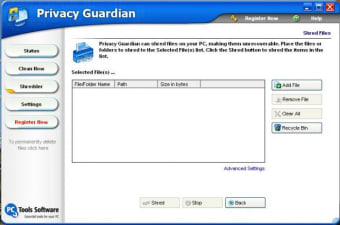
Erase all traces of your Internet and PC activity

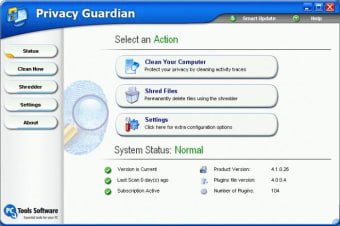
Privacy is such a key issue these days, yet we often neglect to think about just how exposed our movements are. Click on the Windows 'Start' menu then highlight 'Documents' - every file you've accessed recently. Now click Ctrl-H - a list of all the web sites you've visited today. Starting to get the picture? Thankfully there are lots of programs out there that can help you shield this information from prying eyes, and Privacy Guardian is one of the most comprehensive I've seen.

Top Recommended Alternative

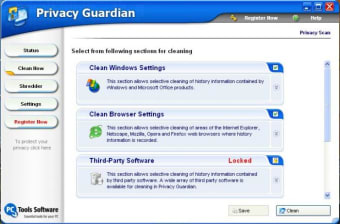
The application is a breeze to install and set up, and once running it cleans traces of your activity very thoroughly, including a file shredder to make sure that no one, but no one, sees that you were looking at that Spice Girls web site. Unfortunately there's no stealth mode within the program but Privacy Guardian makes up for this minor shortfall in other ways. For instance, it's the only tracks eraser I know of that can remove all MS Office history, and it has an automatic scheduler that performs clean-ups on startup or shutdown.

This is a highly user friendly application that lets you delete unwanted traces of PC and Net activity without a lot of hassle. Highly recommended.
  • Pros

    • Removes traces quickly and thoroughly
    • Auto task scheduler
    • Removes MS Office history
  • Cons

    • No stealth mode
 0/3

App specs

  • License

    Trial version

  • Version

    4.1.0.36

  • Latest update

  • Platform

    Windows

  • OS

    Windows 98 SE

  • Language

    English

  • Downloads

    5.8K

  • Size

    3.97 MB

  • Developer

Program available in other languages


User reviews about Privacy Guardian

Have you tried Privacy Guardian? Be the first to leave your opinion!

Add review

You may also like

Explore Apps

Latest articles

Laws concerning the use of this software vary from country to country. We do not encourage or condone the use of this program if it is in violation of these laws. Softonic may receive a referral fee if you click or buy any of the products featured here.
Softonic

Is Privacy Guardian safe?

100/100

Score result: Clean

This file passed a comprehensive security scan using VirusTotal technology. It is safe to download.

  • Virus free
  • Spyware free
  • Malware free
  • Verified by Security Partners

    VirusTotal logo

Scan Info

Last scan
Monday, November 20, 2023
Scan provider
VirusTotal · Full report

File Integrity

File
pginstall.exe
SHA256
af600354f95907f30d16d88c18870d27d87ff5ac5c57b55c1fd0a037e5213bba
SHA1
2e2d63dd05cd9a7d54abd4a2254b537dd7c341f7

Softonic security commitment

Privacy Guardian has been thoroughly scanned by our advanced security systems and verified by industry-leading partners. This file comes from the official developer and has passed all our security checks, showing no signs of viruses, malware, or spyware. For more information, visit our Security and Trust Center